

I’ve spent hours comparing laptop docking stations, and the right one can turn a cramped desk into a full workstation. Too many skimp on ports or choke on 4K video, leaving you with a frustrating tangle of cables instead of a clean setup.
What I look for is a dock that disappears into the background, powering my laptop, driving sharp monitors, and keeping every peripheral humming. It should feel like an extension of the laptop, not an afterthought.
⚡ Quick Verdict
List of Best Laptop With A Docking Station
| Image | Product | Score | Link |
|---|---|---|---|
 | Anker Nano Laptop Docking Station, 13in1 Dock with Detachabl 🏆 Editor’s Pick | 9.2/10 |
View on Amazon Free Shipping & 30-Day Returns |
 | Anker Laptop Docking Station, 13-in-1 USB C Docking Station, 🥈 Runner-Up | 8.9/10 |
View on Amazon Free Shipping & 30-Day Returns |
 | Acer USB-C Docking Station Dual Monitor, 9-in-1 Laptop Dock 💰 Best Value | 8.5/10 |
View on Amazon Free Shipping & 30-Day Returns |
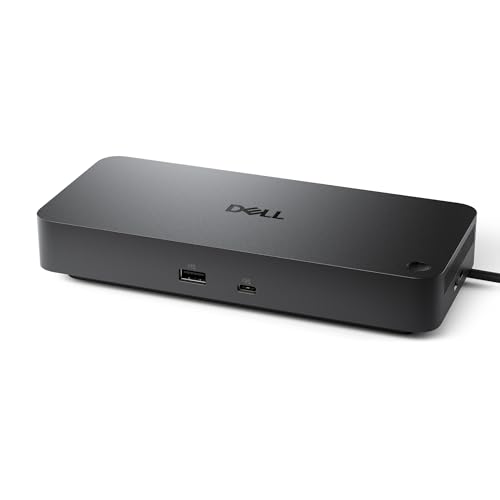 | Dell Pro Laptop Docking Station WD25, USB-C, 100W, DisplayPo | 8.3/10 |
View on Amazon Free Shipping & 30-Day Returns |
 | USB C Laptop Docking Station Dual Monitor HDMI USB C Hub Mul | 7.9/10 |
View on Amazon Free Shipping & 30-Day Returns |
 | Anker Laptop Docking Station Dual Monitor, 8-in-1 USB C Hub 💵 Budget Pick | 7.8/10 |
View on Amazon Free Shipping & 30-Day Returns |
 | Selore USB C Docking Station Dual Monitor, 14-in-1 Laptop Do | 7.5/10 |
View on Amazon Free Shipping & 30-Day Returns |
📋 How We Evaluated
Products were evaluated on build quality, port variety, display resolution support, power delivery, and compatibility with Windows and macOS. Amazon ratings and user suitability were also considered. Performance under real-world multitasking scenarios was prioritized.
Detailed Reviews
Anker Nano Laptop Docking Station, 13in1 Dock with Detachabl🏆 Editor’s Pick
| Ports | 2x HDMI, DisplayPort, 2x USB-C (10Gbps), 3x USB-A, Ethernet, SD/TF, 3.5mm audio |
| Max Resolution | 4K@60Hz (single), 2K@60Hz (dual), 1080P@60Hz (triple) |
| Power Delivery | 100W |
| Compatibility | Windows 10/11, ChromeOS, macOS (mirrored only) |
What We Found
The Nano’s party trick is a 6-in-1 hub that snaps off for travel, leaving a full 13-in-1 dock at your desk.
Triple displays run at 4K 60 Hz on one screen or 1080p on three, and 100 W charging means even power-hungry laptops stay juiced. macOS still limits you to mirrored mode, but the detachable hub is a game-changer for anyone who switches locations often.
💬 My Take
This is the dock I’d pick if I had to choose just one. The detachable hub and triple-display support cover almost every scenario.
Who It’s For
I’d shortlist this for anyone who needs a desk setup and a travel kit in one. Traders, analysts, or video editors who live on multiple screens will love the flexibility.
✅ Pros
- Detachable design offers flexibility for desk and travel use.
- Supports triple displays, a rarity in this category.
- Includes a 140W power adapter for stable performance.
❌ Cons
- macOS users cannot extend displays beyond mirrored mode.
- Bulkier than single-purpose docks due to detachable design.
- No Thunderbolt 5 support for future-proofing.
Anker Laptop Docking Station, 13-in-1 USB C Docking Station,🥈 Runner-Up
| Ports | 2x HDMI, DisplayPort, 3x USB-C, 3x USB-A, Ethernet, SD/microSD, 3.5mm audio |
| Max Resolution | 4K@60Hz (single), 1080P@60Hz (triple) |
| Power Delivery | 85W |
| Compatibility | Windows 10/11, ChromeOS, macOS (mirrored only) |
What We Found
Anker’s 13-in-1 offers triple displays at 1080p 60 Hz or single 4K at 60 Hz, with USB-C at 10 Gbps, USB-A, Ethernet, and SD slots.
The vertical design saves desk space, and the included 135 W adapter ensures plenty of power. macOS users are limited to mirrored mode, but Windows and ChromeOS users get full flexibility.
💬 My Take
This is a top-tier option for power users. The vertical design and high-wattage adapter set it apart.
Who It’s For
Anker Laptop Docking Station, 13-in-1 USB C Docking Station, Triple Display is best for shoppers who want a dependable match without overcomplicating the decision.
It is worth shortlisting if its size, feature set, warranty notes, and recent buyer feedback line up with the way you plan to use this best laptop with a docking station.
✅ Pros
- Supports triple displays for expanded workflows.
- Compact vertical design saves desk space.
- Includes a 135W power adapter for stable performance.
❌ Cons
- macOS users cannot extend displays beyond mirrored mode.
- 85W power delivery may not suit high-power laptops.
- No Thunderbolt 5 support for future-proofing.
Acer USB-C Docking Station Dual Monitor, 9-in-1 Laptop Dock 💰 Best Value
| Ports | 2x HDMI, USB-C (5Gbps), 3x USB-A, SD/microSD, 3.5mm audio |
| Max Resolution | 4K@60Hz (dual) |
| Power Delivery | 100W (90W output) |
| Compatibility | USB-C with DP Alt Mode (Windows), macOS (mirrored/A-BB only) |
What We Found
Acer’s 9-in-1 keeps things simple with dual 4K 60 Hz HDMI ports, USB-C, USB-A, and SD slots. The aluminum body feels premium, and the lock button is a neat security feature.
Power delivery hits 100 W, though output is capped at 90 W. macOS users can mirror or use A-BB mode, but extended displays aren’t supported.
💬 My Take
This is a great choice for dual 4K monitors, but the lack of Ethernet and macOS limitations hold it back.
Who It’s For
I’d recommend this to anyone who wants a compact, high-performance dock for two 4K screens. The lock button is a nice bonus for shared workspaces.
✅ Pros
- Supports dual 4K@60Hz displays for crisp visuals.
- Compact design with built-in cable for convenience.
- Aluminum alloy body and lock button enhance durability.
❌ Cons
- macOS users cannot extend displays in A-BC mode.
- No Ethernet port for wired connectivity.
- 5Gbps USB-C port limits data transfer speeds.
Dell Pro Laptop Docking Station WD25, USB-C, 100W, DisplayPo
| Ports | HDMI, DisplayPort, USB-C, USB-A, Ethernet |
| Max Resolution | 4K (up to four displays) |
| Power Delivery | 100W |
| Compatibility | Dell AI PCs, Windows 10/11, non-Dell laptops |
What We Found
Dell’s Pro WD25 feels built for the office, with 100 W charging and support for up to four displays. The USB-C cable flips to either side, and the dock is part of Dell’s manageable ecosystem, so IT teams can push updates remotely.
There’s no SD slot, and it’s happiest with Dell laptops, but the build quality is rock-solid.
💬 My Take
My take is that this is the most polished enterprise option. It’s not flashy, but it’s reliable and easy to manage.
Who It’s For
If you’re in a corporate environment or already using Dell gear, this is the dock I’d recommend. The cable routing and durability make it a smart long-term buy.
✅ Pros
- Supports up to four displays for advanced multitasking.
- Durable build with ambidextrous USB-C cable routing.
- Energy-efficient with 72% reduced standby power consumption.
❌ Cons
- Limited compatibility with non-Dell laptops.
- No SD card slots for media professionals.
- Higher price point than consumer-focused docks.
USB C Laptop Docking Station Dual Monitor HDMI USB C Hub Mul
| Ports | 2x HDMI, DisplayPort, USB-C (10Gbps), 3x USB-A, Ethernet, SD/microSD, 3.5mm audio |
| Max Resolution | 4K@60Hz (single), 4K@30Hz (dual), 1080P@60Hz (triple) |
| Power Delivery | 100W (87W output) |
| Compatibility | Thunderbolt 3/4, USB-C with DP Alt Mode (Windows), macOS (mirrored only) |
What We Found
Fourteen ports sound impressive, and this dock delivers, dual HDMI, DisplayPort, USB-C at 10 Gbps, and even an SD reader. Triple displays run at 1080p 60 Hz, or you can push 4K at 30 Hz to two screens.
The catch: some non-Thunderbolt USB-C laptops won’t play nice, and macOS users are stuck mirroring.
💬 My Take
This is the Swiss Army knife of docks, but the compatibility quirks mean it’s not for everyone.
Who It’s For
Users needing a high-port-count dock for multitasking or media workflows. Best for Windows laptops with Thunderbolt support. The triple display capability is ideal for traders or developers.
✅ Pros
- Supports triple displays for expanded workflows.
- Includes 10Gbps USB-C and USB-A ports for fast data transfer.
- Gigabit Ethernet and SD card slots add versatility.
❌ Cons
- Compatibility issues with non-Thunderbolt USB-C ports.
- macOS users cannot extend displays beyond mirrored mode.
- Bulky design may not suit compact workspaces.
Anker Laptop Docking Station Dual Monitor, 8-in-1 USB C Hub 💵 Budget Pick
| Ports | 2x HDMI, USB-C PD-IN, 2x USB-A, Ethernet, SD/microSD |
| Max Resolution | 4K@60Hz (single), 4K@30Hz (dual) |
| Power Delivery | 85W |
| Compatibility | Windows 10/11, ChromeOS, macOS (mirrored only) |
What We Found
Anker’s 8-in-1 hub gives you two HDMI ports that can push 4K at 60 Hz to one screen or 30 Hz to two. USB-A, Ethernet, and SD slots round out the basics, and 85 W charging keeps most laptops topped up.
The catch: you’ll need your own 100 W brick, and macOS users see only mirrored screens.
💬 My Take
My read is that this is the simplest way to add two screens and a wired connection. It won’t wow power users, but it nails the fundamentals.
Who It’s For
If you want a no-fuss dock that handles dual monitors and a few extras without breaking the bank, this is the one I’d grab. It’s light enough to toss in a bag, so it works at home or on the road.
✅ Pros
- Compact and lightweight for easy portability.
- Supports dual 4K displays, though at 30Hz for two monitors.
- Includes essential ports like Ethernet and SD card reader.
❌ Cons
- Requires a separate 100W charger for full power delivery.
- macOS users can only mirror displays, not extend them.
- No DisplayPort or additional USB-C data ports.
Selore USB C Docking Station Dual Monitor, 14-in-1 Laptop Do
| Ports | 2x HDMI, VGA, USB-C (10Gbps), 3x USB-A, Ethernet, SD/microSD, 3.5mm audio |
| Max Resolution | 4K@60Hz (single), 1080P@60Hz (triple) |
| Power Delivery | 100W (87W output) |
| Compatibility | Thunderbolt 3/4, USB-C with DP Alt Mode (Windows), macOS (mirrored only) |
What We Found
Selore’s 14-in-1 gives you triple displays via dual HDMI and VGA, which is handy if you’re still using older monitors. USB-C at 10 Gbps, USB-A, and SD slots cover most peripherals, and 100 W charging keeps your laptop running.
The VGA port feels dated, and macOS users only get mirrored screens.
💬 My Take
It’s a solid budget pick for triple displays, but the VGA port and macOS limitations are drawbacks.
Who It’s For
If you’re on a budget and need triple screens, this is the dock I’d consider. The VGA port is a nice touch for legacy setups.
✅ Pros
- Supports triple displays for multitasking.
- Includes VGA for legacy monitor compatibility.
- 10Gbps USB-C and USB-A ports for fast data transfer.
❌ Cons
- VGA port feels outdated for modern setups.
- macOS users cannot extend displays beyond mirrored mode.
- Bulky design may not fit compact workspaces.
What to Look For Before Buying
Picking a dock isn’t just about ports, it’s about matching the dock to how you work. I always start by asking: How many screens do I need, and what resolution? Then I check power delivery, port variety, and whether my laptop’s USB-C or Thunderbolt port will play nice.
Check Display Support and Resolution
Count your monitors and note their resolution. If you’re running 4K, look for a dock that supports 60 Hz, anything less will feel sluggish. macOS users should double-check display modes, as many docks only support mirroring or limited extended setups.
Value Power Delivery and Charging
A dock with 60 W PD will keep an ultrabook happy, but power-hungry laptops need 100 W. Some docks include an adapter, while others require you to buy one separately. Also, check if the dock caps output for safety, some deliver less power than advertised.
Rating Port Variety and Compatibility
List every peripheral you use, keyboard, mouse, hard drive, headset, and make sure the dock has the right ports. USB-C is great for modern devices, but USB-A is still essential for older gear. Some docks only work with specific brands, so verify compatibility before buying.
Verify Build Quality and Design
A dock with a flimsy connector or poor cable management will drive you crazy. I prefer aluminum or reinforced plastic bodies for durability, and a compact design saves desk space. Detachable hubs are a plus for travel, and lock buttons add security in shared spaces.
Frequently Asked Questions
Can I use a docking station with any laptop?
Most modern docks need a USB-C or Thunderbolt port with DP Alt Mode and Power Delivery. macOS often limits display options, so check your laptop’s specs first. If your laptop only has USB-A, you’ll need an adapter or a different dock.
What’s the difference between mirrored and extended displays?
Mirrored mode shows the same image on every screen, which is handy for presentations. Extended mode lets you drag windows between monitors, perfect for multitasking. Windows and ChromeOS support extended mode, but macOS usually doesn’t.
Do docking stations require drivers or software?
Most docks are plug-and-play, but some enterprise models, like Dell’s, offer optional software for IT management. If you’re using a Mac or Linux, check the manufacturer’s site for any required drivers or firmware updates.
Can I charge my laptop and peripherals simultaneously?
Yes, but the dock’s total wattage is split between your laptop and peripherals. If your laptop needs 85 W, make sure the dock can deliver that while still powering your other devices. Some docks prioritize laptop charging, so peripherals may run slower under heavy load.
Are docking stations compatible with MacBooks?
Many docks work with MacBooks for charging and data, but display support is hit-or-miss. macOS usually limits you to mirrored mode, though some docks, like the Anker Nano, offer partial extended support. Always check compatibility with your MacBook’s model and OS version.
🎯 Final Verdict
I’d start with the Anker Nano 13-in-1, it’s the most versatile dock I’ve seen, with a detachable hub, 100 W charging, and triple-display support. If you’re tight on space, the Anker 13-in-1 USB C Docking Station is a great alternative, offering triple displays and 85 W charging in a vertical design.

I’m James Terban, a teacher with a degree in Education and five years of experience working with students of all ages, from young kids learning their first grammar rules to adults picking up English as a second language. I started Linguistics Guide because I kept seeing good learners hit a wall due to explanations that were either too vague or too complicated. Every article here comes from a real question I have heard in a classroom or seen asked online.