

When I type from paper, my neck starts to ache within minutes. A good document holder lifts the page to eye level, so I don’t have to hunch over the keyboard all day.
I look for three things: sturdy build, easy adjustability, and a design that stays put. A line guide or clip keeps pages from sliding, and a compact footprint saves desk space.
⚡ Quick Verdict
List of Best Document Holder For Typing
| Image | Product | Score | Link |
|---|---|---|---|
 | Desktop Document Holder Stand with 7 Adjustable Positions, B 🏆 Editor’s Pick | 9.1/10 |
View on Amazon Free Shipping & 30-Day Returns |
 | TONOS Paper Stand Document Holder – Quality Document Holder 🥈 Runner-Up | 8.8/10 |
View on Amazon Free Shipping & 30-Day Returns |
 | Kensington Document Holder for Typing for Laptops and Monito 💰 Best Value | 7.9/10 |
View on Amazon Free Shipping & 30-Day Returns |
 | HAUTOCO Monitor Mount Document Clip, Document Holder for Typ | 7.7/10 |
View on Amazon Free Shipping & 30-Day Returns |
 | Rodarola Desktop Document Holder for Typing Clipboard, Paper | 7.5/10 |
View on Amazon Free Shipping & 30-Day Returns |
 | 3M Desktop Document Holder for Monitor, 3.375 in x 12.0 in x | 7.2/10 |
View on Amazon Free Shipping & 30-Day Returns |
 | Paper Holder for Typing, White Typing Stand Document Holder | 7.0/10 |
View on Amazon Free Shipping & 30-Day Returns |
📋 How We Evaluated
Products were assessed on build quality, adjustability, stability, and ergonomic benefits. Performance in real-world typing scenarios and value for money were also key factors. Amazon rating signals and user suitability informed final judgments.
Detailed Reviews
Desktop Document Holder Stand with 7 Adjustable Positions, B🏆 Editor’s Pick
| Material | High-quality metal and ABS |
| Dimensions | 13.9″ x 8.3″ (35.5cm x 21cm) |
| Adjustable Positions | 7 |
| Weight | Not specified |
| Foldable | Yes |
What We Found
This holder gives me seven angles to choose from, so I can match the page to my screen height. The metal back feels solid, and the clip stops even thick catalogs from flopping. It folds flat when I need the desk clear.
💬 My Take
My read is that the adjustability and build quality make it worth the investment. I would pick this when comfort and durability matter more than portability.
Who It’s For
If I spend hours transcribing or coding from printed sheets, this stand keeps my posture in check. Students with heavy textbooks or remote workers juggling multiple documents would benefit too.
✅ Pros
- Seven adjustable positions cater to various ergonomic needs and preferences.
- Sturdy metal construction supports heavy documents without tipping or bending.
- Line guide and paper clip enhance productivity by keeping pages secure and visible.
❌ Cons
- Lacks Amazon rating data, making user feedback difficult to assess.
- No price listed, which may complicate budget comparisons.
- Bulkier than some alternatives, limiting portability for travel.
TONOS Paper Stand Document Holder – Quality Document Holder 🥈 Runner-Up
| Material | Stainless steel and ABS |
| Dimensions | 14″ x 9″ (35.6cm x 23cm) |
| Adjustable Positions | 7 |
| Weight | Not specified |
| Foldable | Yes |
What We Found
The TONOS document holder offers 7 adjustable angles for ergonomic comfort, reducing neck and eye strain. Made of stainless steel and ABS, it combines durability with a sleek design. The wide base ensures stability, while the foldable structure allows for easy storage.
Suitable for typing, reading, or displaying recipes, it adapts to various tasks with ease.
💬 My Take
I like the balance of strength and flexibility. It feels like a workhorse that can handle recipes, scripts, or spreadsheets without tipping.
Who It’s For
I would recommend this to anyone who switches between typing, reading, and cooking. Teachers, students, or home cooks who need a sturdy, portable stand would find it useful.
✅ Pros
- Stainless steel construction ensures long-term durability and stability.
- Multifunctional design supports typing, reading, and recipe display.
- Foldable and lightweight, making it easy to store or transport.
❌ Cons
- No user ratings available to gauge real-world performance.
- Larger footprint may not suit compact desks or tight spaces.
- Price not listed, which could deter budget-conscious buyers.
Kensington Document Holder for Typing for Laptops and Monito💰 Best Value
| Material | High-impact molded plastic |
| Dimensions | 9.75″L x 1.50″D x 1.75″H |
| Adjustable | Gooseneck design |
| Weight | Not specified |
| Portable | Yes |
What We Found
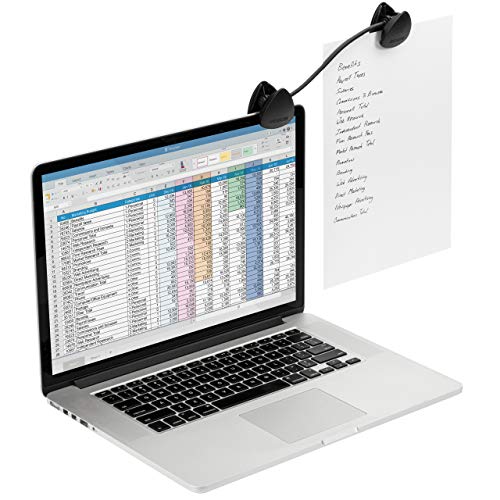
The Kensington Document Holder features a flexible gooseneck design, allowing users to position documents at the most comfortable angle. The clip attaches to laptops or monitors, making it ideal for dual-screen setups. Compact and lightweight, it’s constructed from high-impact molded plastic for durability.
Measures 9.75″ wide, fitting neatly on most desks.
💬 My Take
The gooseneck is the star here. It lets me position the page exactly where I need it, though I’d prefer metal for long-term use.
Who It’s For
I would shortlist this for a dual-monitor setup where desk space is tight. Remote workers or students who need to glance between screens and notes would appreciate the flexibility.
✅ Pros
- Gooseneck design allows for precise, customizable document positioning.
- Attaches to laptops or monitors, freeing up desk space.
- Compact and lightweight, making it easy to transport or store.
❌ Cons
- Plastic construction may not feel as sturdy as metal alternatives.
- Limited capacity for holding multiple or heavy documents.
- No user ratings to confirm long-term durability.
HAUTOCO Monitor Mount Document Clip, Document Holder for Typ
| Material | Not specified |
| Adjustable Arm | 180° rotation |
| Capacity | Up to 10 sheets |
| Adhesive Base | Yes |
| Portable | Yes |
What We Found
The HAUTOCO Monitor Mount Document Clip attaches to laptops or monitors with a strong adhesive base, offering 180° adjustability for optimal viewing angles. Holds up to 10 sheets, making it versatile for recipes, notes, or scripts.
The twist-to-lock stand provides stability, and the compact design allows for easy removal and storage.
💬 My Take
The adhesive mount is clever, and the adjustability is a plus. I’d want to see how long the adhesive lasts before committing.
Who It’s For
If I stream or present often, this keeps my script at eye level. Students or professionals who need a hands-free solution would find it useful too.
✅ Pros
- Adhesive base allows for tool-free installation on monitors or desks.
- 180° adjustable arm provides precise document positioning.
- Compact and removable, making it easy to store or travel with.
❌ Cons
- Adhesive may lose stickiness over time or damage surfaces.
- Limited to holding 10 sheets, which may not suit heavy documents.
- No Amazon ratings or material specifications provided.
Rodarola Desktop Document Holder for Typing Clipboard, Paper
| Material | Virgin plastic (eco-friendly) |
| Dimensions | 9 x 13 inches |
| Weight | 9 ounces (260 grams) |
| Adjustable | Ergonomic standing angle |
| Foldable | Yes |
What We Found
The Rodarola Document Holder doubles as a clipboard and standing document holder, offering ergonomic angles to reduce neck strain. Made from eco-friendly virgin plastic, it’s durable and waterproof. The foldable design allows for easy storage, and the 9 x 13-inch size fits A4 and letter-sized paper.
Weighs just 9 ounces, making it highly portable.
💬 My Take
I like the two-in-one design. It’s not as adjustable as others, but the portability makes up for it.
Who It’s For
If I need a holder that doubles as a clipboard, this is a smart pick. Students taking notes in class or professionals jotting down ideas on the go would find it handy.
✅ Pros
- Doubles as a clipboard and standing document holder for added versatility.
- Eco-friendly materials with no formaldehyde or pungent odors.
- Lightweight and portable, fitting easily into bags or briefcases.
❌ Cons
- Plastic build may not feel as sturdy as metal alternatives.
- Limited adjustability compared to multi-position holders.
- No Amazon ratings to assess real-world performance.
3M Desktop Document Holder for Monitor, 3.375 in x 12.0 in x
| Material | Plastic |
| Dimensions | 3.375″ x 12.0″ x 1.75″ |
| Adjustable Clip | Yes |
| Weight | Not specified |
| Foldable | Yes |
What We Found
The 3M Desktop Document Holder keeps documents upright with a height-adjustable clip for portrait or landscape viewing. The non-skid base prevents slipping, and the line guide helps track progress. Folds flat for storage, making it a practical choice for offices or home workstations. Supports letter and legal-sized documents.
💬 My Take
My take is that it’s a no-frills solution. It won’t wow me with features, but it won’t let me down for light use either.
Who It’s For
If I just need a basic holder for occasional typing, this fits the bill. It’s small enough for a crowded desk, and the price won’t break the bank.
✅ Pros
- Non-skid base provides stability on most surfaces.
- Compact and foldable, ideal for tight or shared workspaces.
- Line guide helps maintain focus during long typing sessions.
❌ Cons
- Limited adjustability compared to multi-position holders.
- Plastic construction may feel less premium than metal alternatives.
- No Amazon ratings to validate user satisfaction.
Paper Holder for Typing, White Typing Stand Document Holder
| Material | Plastic |
| Dimensions | Not specified |
| Weighted Base | Yes |
| Non-Slip Pads | Yes |
| Portable | Yes |
What We Found
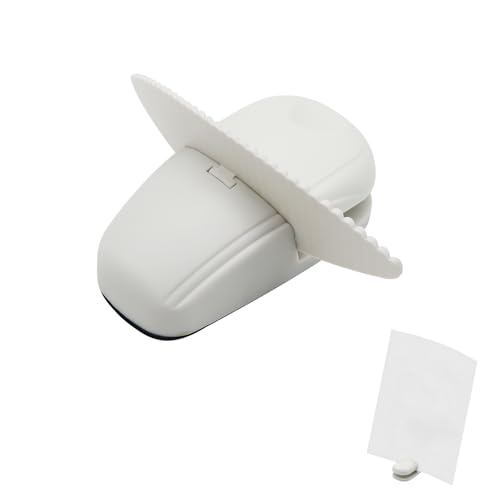
This white typing stand features a weighted base and non-slip pads for stability, keeping documents upright during typing tasks. The compact design fits neatly on desks without crowding workspace. A page clip secures loose sheets, and the lightweight plastic construction makes it easy to move.
Ideal for notes, forms, or office work.
💬 My Take
It’s a straightforward, stable holder. The weighted base is a nice touch, but I’d look elsewhere if I need adjustability.
Who It’s For
I would choose this for a home office or sewing table where space is limited. It’s simple, stable, and gets the job done without extra features.
✅ Pros
- Weighted base and non-slip pads provide excellent stability.
- Compact design fits well in small or crowded workspaces.
- Lightweight and easy to move or store as needed.
❌ Cons
- Plastic construction may lack the premium feel of metal alternatives.
- No adjustability for ergonomic customization.
- No Amazon ratings or price information available.
What to Look For Before Buying
I start by asking where I’ll use the holder most. A fixed desk might need a sturdy stand, while a laptop on the go calls for something lightweight. Adjustability is key for ergonomics, and stability matters if I’m handling heavy books.
Check Ergonomics and Adjustability
I look for a holder that lets me tweak the height and angle until my neck feels relaxed. A line guide helps me keep my place, and multiple positions mean I can switch tasks without strain.
Value Build Quality and Stability
Metal frames feel more durable, but high-quality plastic can be just as sturdy. A weighted base or non-slip pads prevent tipping, and a clip keeps pages from sliding. I check the weight limit if I use thick documents.
Rating Portability and Storage
If I move between locations, I need a holder that folds flat or fits in a bag. Some clip to monitors or laptops, saving desk space. I think about where I’ll store it when it’s not in use.
Verify Versatility and Additional Features
A holder that doubles as a cookbook stand or recipe display saves me from buying extras. Features like adhesive bases or line guides add convenience. I decide if I need it for one task or several.
Frequently Asked Questions
Why should I use a document holder for typing?
When I type from paper without a holder, my neck starts to ache quickly. A holder brings the page to eye level, so I don’t have to bend down. It also keeps my desk organized and my focus sharp.
Are metal document holders better than plastic ones?
Metal holders feel more durable and stable, especially with heavy books. Plastic is lighter and often cheaper, but it may not last as long. I choose based on how much use it will get and where I’ll use it.
Can a document holder help with ergonomic issues?
Yes, an adjustable holder lets me position the page at a comfortable angle. This reduces strain on my neck and shoulders, which can help prevent long-term issues. I look for multiple positions or a flexible arm for the best results.
What size document holder do I need?
Most holders fit letter or A4 paper, but I check the dimensions if I use larger sheets. A wide base or adjustable clip helps with stability. For tight spaces, I prefer a compact model that doesn’t take up much room.
How do I clean and maintain a document holder?
I wipe plastic or metal with a damp cloth to remove dust. For adhesive holders, I check the stickiness regularly. I store foldable holders in a dry place to keep them in good shape.
🎯 Final Verdict
I would reach for the Desktop Document Holder Stand first. The seven adjustable positions and metal build make it a reliable choice for long typing sessions. If I need something more portable, the TONOS Paper Stand offers durability and versatility in one package.

I’m James Terban, a teacher with a degree in Education and five years of experience working with students of all ages, from young kids learning their first grammar rules to adults picking up English as a second language. I started Linguistics Guide because I kept seeing good learners hit a wall due to explanations that were either too vague or too complicated. Every article here comes from a real question I have heard in a classroom or seen asked online.