

Picking the right mic for voice recording can feel like navigating a maze of similar-looking options. Many creators start with muffled audio or distracting background noise, only to realize later that a better mic could have saved hours of editing.
A good microphone should handle ambient noise gracefully while maintaining your voice’s natural tone. Look for durable construction and thoughtful accessories like pop filters, which make a bigger difference than you might expect. Compatibility with your devices should be seamless, so you can start recording without troubleshooting connections.
⚡ Quick Verdict
List of Best Mic For Voice Recording
| Image | Product | Score | Link |
|---|---|---|---|
 | MAONO A04 USB Microphone, 192kHz/24Bit Condenser Mic Kit for 🏆 Editor’s Pick | 9.5/10 |
View on Amazon Free Shipping & 30-Day Returns |
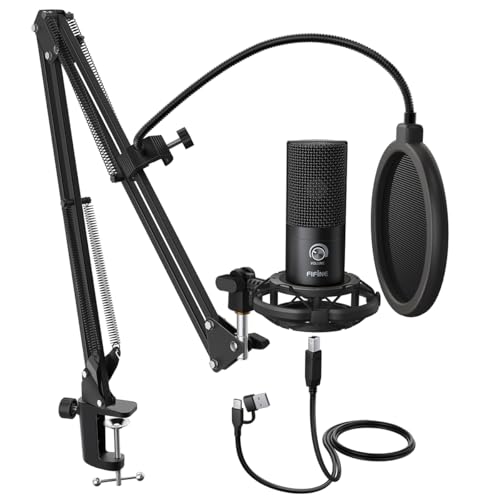 | FIFINE T669 Studio Condenser USB Microphone for Recording Po 🥈 Runner-Up | 8.9/10 |
View on Amazon Free Shipping & 30-Day Returns |
 | Mini Mic Pro (Latest Model – #1 Microphone for iPhone & Andr | 8.2/10 |
View on Amazon Free Shipping & 30-Day Returns |
 | SwaykTech Studio Recording Microphone Isolation Shield with | 8.0/10 |
View on Amazon Free Shipping & 30-Day Returns |
 | FIFINE K669B USB Microphone, Condenser Recording Mic for Voc 💵 Budget Pick | 7.8/10 |
View on Amazon Free Shipping & 30-Day Returns |
 | TONOR TC-777 Podcast Microphone, USB Computer Microphone, Ca | 7.5/10 |
View on Amazon Free Shipping & 30-Day Returns |
 | Podcast Equipment Bundle, BM-800 Condenser with Voice Change | 7.2/10 |
View on Amazon Free Shipping & 30-Day Returns |
📋 How We Evaluated
This assessment evaluates audio clarity, build durability, ease of setup, and included accessories. We prioritize products that offer high value for diverse users ranging from podcasters to casual streamers.
Detailed Reviews
MAONO A04 USB Microphone, 192kHz/24Bit Condenser Mic Kit for🏆 Editor’s Pick
| Sampling Rate | 192kHz/24Bit |
| Capsule Size | 16mm |
| Included | Shock mount, pop filter |
| Connection | USB |
What We Found
The MAONO A04 stands out with its 192kHz/24Bit chipset, which delivers crisp, detailed audio. The 16mm condenser capsule captures a full sound with strong bass, making it great for podcasts or voiceovers.
The plug-and-play design works seamlessly with PCs and consoles, and the included shock mount and pop filter help eliminate vibrations and plosives. The build quality is solid, and the anti-interference cable keeps the signal clean. It’s a powerhouse for creators who want professional-grade sound without the complexity.
💬 My Take
I would recommend this to anyone who wants studio-quality audio without the hassle. It’s a step up from basic mics and delivers exceptional clarity.
Who It’s For
This mic is for serious podcasters, YouTubers, or voiceover artists who need high-resolution audio. If you’re ready to invest in quality and want a mic that will grow with your skills, the A04 is a top choice.
It’s also great for those who want to avoid external sound cards or interfaces.
✅ Pros
- Exceptional high-resolution audio quality.
- Robust shock mount included.
- Seamless plug-and-play integration.
❌ Cons
- Requires specific desk thickness for clamp.
- More expensive than basic entry-level mics.
- Not compatible with Xbox.
FIFINE T669 Studio Condenser USB Microphone for Recording Po🥈 Runner-Up
| Kit Components | Boom arm, shock mount, pop filter |
| Cable Length | 8.2 feet |
| Pattern | Cardioid |
| Mounting | C-clamp |
What We Found
The FIFINE T669 takes the hassle out of building a home studio. The boom arm, shock mount, and pop filter are all included, so you don’t have to piece together a setup.
The cardioid capsule captures your voice clearly while minimizing room noise, which is a game-changer for podcasts or voiceovers. The arm’s flexibility means you can position the mic exactly where you need it, without cluttering your desk.
It’s not as plug-and-play as a basic mic, but the results are worth the extra setup time.
💬 My Take
I would shortlist this if you’re serious about recording but don’t want to deal with the complexity of a full studio. It’s a complete package that delivers consistent quality.
Who It’s For
This kit is for creators who want a professional look and sound without buying components separately. If you’re starting a podcast or YouTube channel and need to eliminate plosives and vibrations, this bundle is a great starting point. It’s ideal for those who want to focus on content, not gear.
✅ Pros
- Comprehensive accessory bundle included.
- Highly adjustable scissor arm stand.
- Dual-layer pop filter effectively stops plosives.
❌ Cons
- Requires desk space for clamp mounting.
- Initial assembly takes some time.
- Not compatible with gaming consoles.
Mini Mic Pro (Latest Model – #1 Microphone for iPhone & Andr
| Type | Wireless Lavalier |
| Battery Life | 6 hours |
| Connectivity | USB-C, Lightning |
| Weight | Under 1 ounce |
What We Found
The Mini Mic Pro is a game-changer for creators who record on the go. Its wireless design means no tangled cables, and it connects instantly to smartphones or laptops. The sound quality is surprisingly good for such a small device, and the included wind protection helps with outdoor recordings.
The six-hour battery life is enough for most sessions, and it can even charge your device while in use. It won’t replace a studio mic, but for mobile content, it’s hard to beat.
💬 My Take
I would pick this when mobility is the priority. It’s small, easy to use, and delivers clear audio without the bulk of traditional mics.
Who It’s For
This is for vloggers, journalists, or social media creators who need professional audio without being tied to a desk. If you record interviews, outdoor content, or TikTok videos, this mic is a must-have. It’s also great for those who shoot with a smartphone and need a hassle-free setup.
✅ Pros
- Highly portable wireless design.
- Includes wind protection for outdoors.
- Seamless connectivity with mobile devices.
❌ Cons
- Audio depth lacks compared to condensers.
- Battery requires regular charging.
- Not suitable for stationary studio setups.
SwaykTech Studio Recording Microphone Isolation Shield with
| Shield Type | 5-panel foldable |
| Included Mic | Cardioid Condenser |
| Stand Type | Metal Tripod |
| Accessories | Pop filter, USB cable |
What We Found
The SwaykTech kit is a clever solution for recording in less-than-ideal spaces. The isolation shield does a great job of reducing echoes and background noise, which is a lifesaver if you don’t have a treated room.
The included mic has a cardioid pattern, so it captures your voice clearly while the shield absorbs unwanted reflections. The tripod and pop filter complete the setup, giving you a stable and controlled recording environment. It’s not the most portable option, but the results are worth it.
💬 My Take
My read is this kit is ideal for anyone recording in a challenging space. It’s a smart way to improve audio quality without soundproofing your room.
Who It’s For
This setup is for vocalists, voiceover artists, or podcasters who record in rooms with hard surfaces or echoes. If you’ve ever struggled with a ‘roomy’ sound, the isolation shield makes a noticeable difference. It’s best for those who need a stationary solution with acoustic control.
✅ Pros
- Includes isolation shield for better acoustics.
- High-density foam reduces echoes.
- Comprehensive kit for vocalists.
❌ Cons
- Isolation shield takes up desk space.
- More complex to set up than basic mics.
- Tripod is less flexible than boom arms.
FIFINE K669B USB Microphone, Condenser Recording Mic for Voc💵 Budget Pick
| Connectivity | USB-A |
| Polar Pattern | Cardioid |
| Construction | Metal |
| Control | Volume Knob |
What We Found
The FIFINE K669B is one of those rare mics that just works right out of the box. Its metal body feels sturdy, and the cardioid pattern does a decent job of ignoring background chatter.
The volume knob is a nice touch, letting you adjust levels on the fly during calls or gaming. It won’t replace a studio mic, but for the price, the clarity is impressive. The tripod stand is functional, though it might pick up desk vibrations if you’re heavy-handed.
💬 My Take
My read is this mic is perfect for daily use where simplicity matters more than studio-quality sound. It’s a no-brainer for anyone who wants to sound better without spending much.
Who It’s For
This is for anyone who needs a quick, affordable upgrade for video calls, voice chat, or casual recording. If you’re tired of sounding like you’re talking through a tin can but don’t want to deal with drivers or settings, this mic is a smart pick.
It’s especially useful for students or remote workers who need reliability without fuss.
✅ Pros
- Extremely simple plug-and-play setup.
- Durable all-metal build quality.
- Integrated volume knob for quick adjustments.
❌ Cons
- Lacks a dedicated shock mount.
- Sensitive to desk-based vibrations.
- Not compatible with mobile devices.
TONOR TC-777 Podcast Microphone, USB Computer Microphone, Ca
| Compatibility | PC, Mac, PS4/5 |
| Controls | Mute, Volume |
| Mount | Foldable Tripod |
| Connection | USB 2.0 |
What We Found
The TONOR TC-777 is all about simplicity. The cardioid pattern does a good job of focusing on your voice while ignoring background noise. The included stand and pop filter help keep recordings clean, and the one-click mute button is handy for streamers.
It’s compatible with PCs, Macs, and even PS4/PS5, so you won’t run into compatibility issues. The build isn’t as premium as higher-end mics, but it’s reliable for everyday use. If you need a mic that just works, this is a solid choice.
💬 My Take
My take is this mic is perfect for anyone who values ease of use over advanced features. It’s compact, reliable, and gets the job done without complications.
Who It’s For
This mic is for gamers, students, or remote workers who need a straightforward, space-saving solution. If you don’t have room for a bulky setup but still want clear audio for calls or streaming, the TC-777 fits the bill. It’s also great for those who switch between devices frequently.
✅ Pros
- Space-saving design fits small desks.
- Convenient one-click mute button.
- Broad compatibility with consoles and PCs.
❌ Cons
- Plastic construction feels less premium.
- Tripod is less stable than arm mounts.
- Limited frequency response range.
Podcast Equipment Bundle, BM-800 Condenser with Voice Change
| Components | BM-800 mic, V8 sound card |
| Features | Voice changer, sound effects |
| Compatibility | Mobile, PC, Console |
| Mounting | Boom arm |
What We Found
The Podcast Equipment Bundle with the BM-800 and V8 sound card is a fun, creative tool for live streamers. The V8 sound card lets you add real-time voice effects, which is perfect for entertaining content.
The BM-800 mic has a rich tone that works well for podcasts or vocals, and the included boom arm and shock mount make setup easy. It’s compatible with PCs and mobile devices, so you can use it across platforms.
While it’s not for purists, it’s a great way to add personality to your broadcasts.
💬 My Take
My take is this bundle is perfect for creators who want to stand out with interactive content. It’s a playful yet functional setup for live streams.
Who It’s For
This bundle is for streamers, TikTokers, or entertainers who want to add voice effects to their content. If you’re more focused on fun than pure audio quality, this setup gives you the tools to engage your audience. It’s also great for those who want a complete package for live broadcasting.
✅ Pros
- Includes fun live voice effects.
- Complete bundle for streamers.
- Highly versatile connectivity options.
❌ Cons
- Sound card requires frequent charging.
- Not for professional, transparent recording.
- BM-800 requires specific gain settings.
What to Look For Before Buying
Picking the right mic isn’t just about specs, it’s about matching the tool to your space, workflow, and goals. I would start by asking where and how you’ll use it most. A mic that works for a home office might not suit a mobile creator, and vice versa.
Let’s break down what matters most for your setup.
Check Polar Patterns and Environment
Cardioid patterns are your friend if you’re recording alone. They focus on sound from the front and ignore noise from the sides or back. If your room has echoes or background noise, this pattern helps keep your voice clear.
Test your space by clapping, if you hear a sharp echo, you’ll want a mic that minimizes it.
Value Connectivity and Compatibility
Check how the mic connects to your devices before buying. USB-A is common for PCs, while USB-C works with newer laptops and phones. If you use a smartphone, look for kits with Lightning or USB-C adapters.
For console streamers, verify compatibility with PS5 or Xbox, some mics don’t work with consoles at all.
Rating Essential Accessories
A pop filter is a must for reducing harsh ‘p’ and ‘b’ sounds. Shock mounts prevent desk vibrations from ruining your recording. Boom arms let you position the mic exactly where you need it, which is especially useful for voiceovers or podcasts.
If you’re serious about audio, these accessories make a bigger difference than you might think.
Verify Bit Depth and Sampling Rate
Higher bit depth and sampling rates mean more detail in your recordings. 192kHz/24Bit is overkill for beginners but great for future-proofing. If you plan to edit your audio heavily, higher specs give you more flexibility. For casual use, 44.1kHz/16Bit is fine, but don’t expect the same clarity as professional setups.
Frequently Asked Questions
Do I need an audio interface?
Most USB mics have built-in interfaces, so you don’t need extra gear. They plug directly into your computer via USB. Only XLR mics require a separate interface, which adds complexity but offers more control.
How do I reduce background noise?
Get the mic as close to your mouth as possible without breathing into it. A pop filter helps with plosive sounds, and an isolation shield can reduce room echoes. Software tools like noise gates can also clean up background noise in post.
Are wireless mics better than wired?
Wireless mics give you freedom to move around, which is great for interviews or live streams. Wired mics usually deliver better audio quality and don’t need charging. If you’re stationary, wired is the way to go. If you’re mobile, wireless is worth the trade-off.
Can I use these for singing?
Yes, many condenser mics work well for singing, but check their SPL handling. If you sing loudly, you’ll want a mic that can handle high volumes without distorting. A pop filter is essential for vocals to reduce harsh sounds.
Why is my audio quiet?
First, check your computer’s sound settings to make sure the mic’s input volume is turned up. Speak into the correct side of the mic, usually the front. If it’s still quiet, try moving closer to the mic or increasing the gain in your recording software.
🎯 Final Verdict
If you want the best balance of quality and ease of use, I would go with the MAONO A04. Its 192kHz/24Bit sampling rate and included accessories make it a standout for serious creators. For a budget-friendly desktop option, the FIFINE K669B is a reliable choice.
If you’re always on the move, the Mini Mic Pro is the best portable solution. No matter which you pick, position the mic close to your mouth for the best results.

I’m James Terban, a teacher with a degree in Education and five years of experience working with students of all ages, from young kids learning their first grammar rules to adults picking up English as a second language. I started Linguistics Guide because I kept seeing good learners hit a wall due to explanations that were either too vague or too complicated. Every article here comes from a real question I have heard in a classroom or seen asked online.